http://blogs.technet.com/b/infratalks/archive/2013/09/04/transition-from-sbs2011-to-server-2012-the-essentials-route.aspx
http://blogs.technet.com/b/infratalks/archive/2012/09/07/transition-from-small-business-server-to-standard-windows-server.aspx
Tuesday, 3 December 2013

Monday, 2 December 2013
Updating Dell 12G BIOS from the Dell BIOS update utility.
Updating BIOS firmware on Dell servers with ESXi can be tricky. If you are thinking this guy needs to meet the life-cycle controller, your wrong. The Life-cycle controller looks at an old Dell repository. For Example, at the time of writing I know Dell have released BIOS 2.1.2 it's available from the support.euro.dell.com website but the Life-cycle controller shows no new updates. With a Windows OpSys you can just download the .EXE updater and reboot. With ESXi this is not available.
Here is a solution:
Download the .efi file from the support website and copy it to the root of a USB stick.

I use the iDRAC to perform the update, but you insert the USB stick directly into the server and do this from the server console.
Launch the iDRAC console and click the virtual media menu, select the USB stick, in the example below, E drive.

During boot press F11 for the BIO boot manager. Once in the boot manager select. System Utilities.

At the next screen select BIO file explorer.

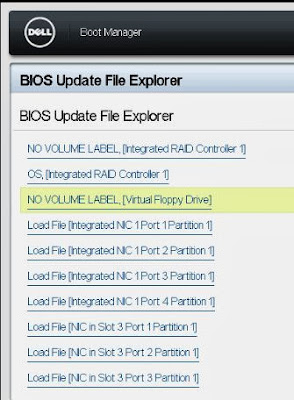


The BIOS update is executed as you can see below.

This is a great way to update the BIOS from the comfort of your chair.
Here is a solution:
Download the .efi file from the support website and copy it to the root of a USB stick.

I use the iDRAC to perform the update, but you insert the USB stick directly into the server and do this from the server console.
Launch the iDRAC console and click the virtual media menu, select the USB stick, in the example below, E drive.

During boot press F11 for the BIO boot manager. Once in the boot manager select. System Utilities.

You then need to locate the device with the .efi file. This should be the virtual floppy drive.

After the file explorer has discovered the efi file you need to select it.
Confirm the firmware upgrade and select Continue BIOS Update.

The BIOS update is executed as you can see below.
This is a great way to update the BIOS from the comfort of your chair.
Thursday, 21 November 2013
Active Directory Health Check script
This handy script can be used to check the health of your active directory.
@echo off
del c:\ADHealth.txt
echo ________________________________ >> c:\ADHealth.txt
echo Domain Controllers In the Domain >> c:\ADHealth.txt
echo ________________________________ >> c:\ADHealth.txt
C:\Windows\System32\DSQUERY Server -o rdn >> c:\ADHealth.txt
echo _________________ >> c:\ADHealth.txt
echo FSMO role holders >> c:\ADHealth.txt
echo _________________ >> c:\ADHealth.txt
C:\Windows\System32\netdom query fsmo >> c:\ADHealth.txt
echo ______________________ >> c:\ADHealth.txt
echo Repadmin - Syncall - e >> c:\ADHealth.txt
echo ______________________ >> c:\ADHealth.txt
C:\Windows\System32\repadmin.exe /syncall /e >> c:\ADHealth.txt
echo ______________________ >> c:\ADHealth.txt
echo Repadmin - Syncall - a >> c:\ADHealth.txt
echo ______________________ >> c:\ADHealth.txt
C:\Windows\System32\repadmin.exe /syncall /A >> c:\ADHealth.txt
echo ______________________ >> c:\ADHealth.txt
echo Repadmin - Syncall - d >> c:\ADHealth.txt
echo ______________________ >> c:\ADHealth.txt
C:\Windows\System32\repadmin.exe /syncall /d >> c:\ADHealth.txt
echo ______________________ >> c:\ADHealth.txt
echo Repadmin - Replsummary >> c:\ADHealth.txt
echo ______________________ >> c:\ADHealth.txt
C:\Windows\System32\repadmin.exe /replsummary * >> c:\ADHealth.txt
echo ______________ >> c:\ADHealth.txt
echo Repadmin - KCC >> c:\ADHealth.txt
echo ______________ >> c:\ADHealth.txt
C:\Windows\System32\repadmin.exe /kcc * >> c:\ADHealth.txt
echo _____________________ >> c:\ADHealth.txt
echo Repadmin - showbackup >> c:\ADHealth.txt
echo _____________________ >> c:\ADHealth.txt
C:\Windows\System32\repadmin.exe /showbackup * >> c:\ADHealth.txt
echo ___________________ >> c:\ADHealth.txt
echo Repadmin - Showrepl >> c:\ADHealth.txt
echo ___________________ >> c:\ADHealth.txt
C:\Windows\System32\repadmin.exe /showrepl * >> c:\ADHealth.txt
echo ________________ >> c:\ADHealth.txt
echo Repadmin - Queue >> c:\ADHealth.txt
echo ________________ >> c:\ADHealth.txt
C:\Windows\System32\repadmin.exe /queue * >> c:\ADHealth.txt
echo ______________________ >> c:\ADHealth.txt
echo Repadmin - Bridgeheads >> c:\ADHealth.txt
echo ______________________ >> c:\ADHealth.txt
C:\Windows\System32\repadmin.exe /bridgeheads * /verbose >> c:\ADHealth.txt
echo _______________ >> c:\ADHealth.txt
echo Repadmin - ISTG >> c:\ADHealth.txt
echo _______________ >> c:\ADHealth.txt
C:\Windows\System32\repadmin.exe /istg * /verbose >> c:\ADHealth.txt
echo _______________________ >> c:\ADHealth.txt
echo Repadmin - Showoutcalls >> c:\ADHealth.txt
echo _______________________ >> c:\ADHealth.txt
C:\Windows\System32\repadmin.exe /showoutcalls * >> c:\ADHealth.txt
echo ____________________ >> c:\ADHealth.txt
echo Repadmin - Failcache >> c:\ADHealth.txt
echo ____________________ >> c:\ADHealth.txt
C:\Windows\System32\repadmin.exe /failcache * >> c:\ADHealth.txt
echo ____________________ >> c:\ADHealth.txt
echo Repadmin - Showtrust >> c:\ADHealth.txt
echo ____________________ >> c:\ADHealth.txt
C:\Windows\System32\repadmin.exe /showtrust * >> c:\ADHealth.txt
echo _______________ >> c:\ADHealth.txt
echo Repadmin - Bind >> c:\ADHealth.txt
echo _______________ >> c:\ADHealth.txt
C:\Windows\System32\repadmin.exe /bind * >> c:\ADHealth.txt
echo ______ >> c:\ADHealth.txt
echo Dcdiag >> c:\ADHealth.txt
echo ______ >> c:\ADHealth.txt
C:\Windows\System32\dcdiag /c /e /v >> c:\ADHealth.txt
start c:\ADHealth.txt
@echo off
del c:\ADHealth.txt
echo ________________________________ >> c:\ADHealth.txt
echo Domain Controllers In the Domain >> c:\ADHealth.txt
echo ________________________________ >> c:\ADHealth.txt
C:\Windows\System32\DSQUERY Server -o rdn >> c:\ADHealth.txt
echo _________________ >> c:\ADHealth.txt
echo FSMO role holders >> c:\ADHealth.txt
echo _________________ >> c:\ADHealth.txt
C:\Windows\System32\netdom query fsmo >> c:\ADHealth.txt
echo ______________________ >> c:\ADHealth.txt
echo Repadmin - Syncall - e >> c:\ADHealth.txt
echo ______________________ >> c:\ADHealth.txt
C:\Windows\System32\repadmin.exe /syncall /e >> c:\ADHealth.txt
echo ______________________ >> c:\ADHealth.txt
echo Repadmin - Syncall - a >> c:\ADHealth.txt
echo ______________________ >> c:\ADHealth.txt
C:\Windows\System32\repadmin.exe /syncall /A >> c:\ADHealth.txt
echo ______________________ >> c:\ADHealth.txt
echo Repadmin - Syncall - d >> c:\ADHealth.txt
echo ______________________ >> c:\ADHealth.txt
C:\Windows\System32\repadmin.exe /syncall /d >> c:\ADHealth.txt
echo ______________________ >> c:\ADHealth.txt
echo Repadmin - Replsummary >> c:\ADHealth.txt
echo ______________________ >> c:\ADHealth.txt
C:\Windows\System32\repadmin.exe /replsummary * >> c:\ADHealth.txt
echo ______________ >> c:\ADHealth.txt
echo Repadmin - KCC >> c:\ADHealth.txt
echo ______________ >> c:\ADHealth.txt
C:\Windows\System32\repadmin.exe /kcc * >> c:\ADHealth.txt
echo _____________________ >> c:\ADHealth.txt
echo Repadmin - showbackup >> c:\ADHealth.txt
echo _____________________ >> c:\ADHealth.txt
C:\Windows\System32\repadmin.exe /showbackup * >> c:\ADHealth.txt
echo ___________________ >> c:\ADHealth.txt
echo Repadmin - Showrepl >> c:\ADHealth.txt
echo ___________________ >> c:\ADHealth.txt
C:\Windows\System32\repadmin.exe /showrepl * >> c:\ADHealth.txt
echo ________________ >> c:\ADHealth.txt
echo Repadmin - Queue >> c:\ADHealth.txt
echo ________________ >> c:\ADHealth.txt
C:\Windows\System32\repadmin.exe /queue * >> c:\ADHealth.txt
echo ______________________ >> c:\ADHealth.txt
echo Repadmin - Bridgeheads >> c:\ADHealth.txt
echo ______________________ >> c:\ADHealth.txt
C:\Windows\System32\repadmin.exe /bridgeheads * /verbose >> c:\ADHealth.txt
echo _______________ >> c:\ADHealth.txt
echo Repadmin - ISTG >> c:\ADHealth.txt
echo _______________ >> c:\ADHealth.txt
C:\Windows\System32\repadmin.exe /istg * /verbose >> c:\ADHealth.txt
echo _______________________ >> c:\ADHealth.txt
echo Repadmin - Showoutcalls >> c:\ADHealth.txt
echo _______________________ >> c:\ADHealth.txt
C:\Windows\System32\repadmin.exe /showoutcalls * >> c:\ADHealth.txt
echo ____________________ >> c:\ADHealth.txt
echo Repadmin - Failcache >> c:\ADHealth.txt
echo ____________________ >> c:\ADHealth.txt
C:\Windows\System32\repadmin.exe /failcache * >> c:\ADHealth.txt
echo ____________________ >> c:\ADHealth.txt
echo Repadmin - Showtrust >> c:\ADHealth.txt
echo ____________________ >> c:\ADHealth.txt
C:\Windows\System32\repadmin.exe /showtrust * >> c:\ADHealth.txt
echo _______________ >> c:\ADHealth.txt
echo Repadmin - Bind >> c:\ADHealth.txt
echo _______________ >> c:\ADHealth.txt
C:\Windows\System32\repadmin.exe /bind * >> c:\ADHealth.txt
echo ______ >> c:\ADHealth.txt
echo Dcdiag >> c:\ADHealth.txt
echo ______ >> c:\ADHealth.txt
C:\Windows\System32\dcdiag /c /e /v >> c:\ADHealth.txt
start c:\ADHealth.txt
Tuesday, 19 November 2013
VMware Standalone Converter 5.5 fails conversion with vim.fault.NonAuthenitcated
During an overnight conversion of a large virtual machine from an old ESX 3.0.2 server to a new ESXi 5.5 server. The conversion failed at 19% with error vim.fault.NonAuthenitcated


After some googling, not much showed up. Took a flyer and retired the job, it completed!!
If at first you don't succeed, try , try and try again. :)
Thursday, 24 October 2013
Adobe flash on Windows server 2012
To get flash to work on Windows server 2012 you need to enable the desktop experience. The instruction on the Adobe website discuss disabling ActiveX filtering, but this is for Windows 8.
import-module ServerManager
Add-WindowsFeature -name Desktop-Experience,qWave ` -IncludeAllSubFeature -IncludeManagementTools
import-module ServerManager
Add-WindowsFeature -name Desktop-Experience,qWave ` -IncludeAllSubFeature -IncludeManagementTools
Thursday, 3 October 2013
Resetting the VMware ESXi trial period
Sometimes I am asked to build a vSphere environment on a trial license from VMware. By default this is 60 days. However after building the environment, updating and testing the trial period will have dropped a number of days. The customer rightly pointed out that this has reduced their trail of the product.
You can use this command at the ESXi shell to reset the trail period back to 60 days.
rm -r /etc/vmware/license.cfg
cp /etc/vmware/.#license.cfg /etc/vmware/license.cfg
/etc/init.d/vpxa restart
cp /etc/vmware/.#license.cfg /etc/vmware/license.cfg
/etc/init.d/vpxa restart
Subscribe to:
Posts (Atom)